Blackmagic Design has announced the latest upgrade to DaVinci Resolve, incorporating a wide range of new features across the platform. With an extended suite of AI tools, new motion effects graphics and more, DaVinci Resolve 21 features workflow improvements across production workflows.
Enhanced content discovery and media analysis is enabled through the AI-powered IntelliSearch tool which locates specific objects or keywords in dialogue. Results appear as whole clips in the Media Pool enabling enhanced clip organisation and editing.
CineFocus allows focal point adjustment, with advanced controls enabling selection of aperture shape and optical effects such as bokeh. Users can keyframe parameters to rack focus, said the company.
AI Speech Generator enables the generation of speech from written text, using one of Blackmagic’s voice models or a user’s own sample. The DaVinci AI Neural Engine can create a unique voice from as little as a 10 second clip with speed, pitch and inflection adjustable to create multiple performances for narration and voiceovers.
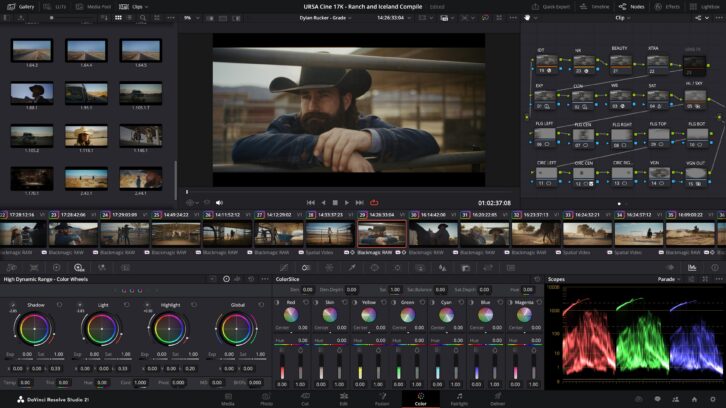
More than 70 new graphics have been added to Fusion with the Krokodove toolset and Fairlight folders simplify audio track management. Additionally, the upgraded solution brings improved keyframing, MultiMaster trim passes and layer list node graphs, said Blackmagic.
Designed to maintain continuity for flashback/forward scenes the AI Face Age Transformer enables a subject’s face to be adjusted to add or remove age-related features, while AI Face Reshaper allows facial features to be changed on a moving subject. Superficial skin imperfections can be removed with the AI Blemish Removal tool.
AI Slate ID detects slate clapperboard details automatically, extracting metadata to reduce manual intervention and accelerate editing.
Previously unusable footage can be improved with DaVinci’s AI UltraSharpen feature, which can also be used to fix slight focus errors. AI Motion Deblur removes common blur artifacts from video content by analysing source files and generating new renders with “significantly reduced blurring”, enabling more dynamic images.
Fusion effects can now be adjusted directly in the keyframes and curves editors of the cut and edit pages, streamlining workflows with text, transitions and motion graphics adjustable without leaving the editing pages.
Native support for OGraf HTML graphics and Lottie animations now enables .json and .lottie files to be dragged directly into the media pool, where they will be treated like fully rendered animation clips. Alpha channels are recognised, allowing customers to layer graphics and titles over video tracks.
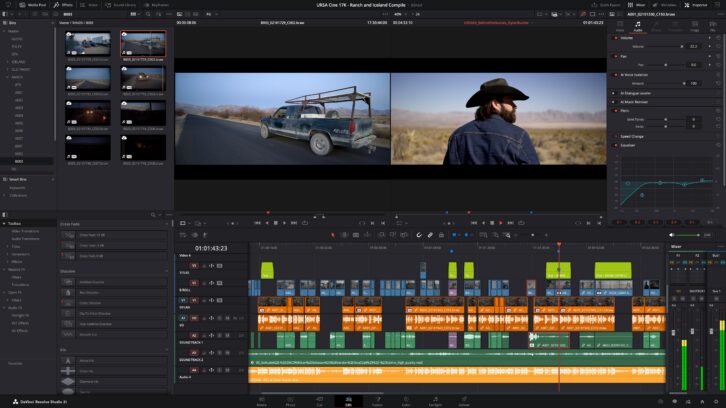
Multi-language spell check is available for all text elements, preview fonts in a dedicated font browser window and use emojis in their text. Character level styling allows different attributes such as font size, weight and colour to be assigned within a single text box, simplifying title design.
MultiMaster trim manager allows multiple HDR and SDR trim deliverables to be generated from a single timeline. When enabled, the node editor will display additional layers for trim operations, allowing colour management of the timeline for each output standard and render each iteration in one go.
A render in place option is now available on the Magic Mask palette, allowing a tracked mask to be cached as a travelling matte mode with the resulting matte automatically linking to the user’s active node. Grading and effects can be applied in real time.
Connecting Fusion to Fairlight’s audio engine, the Fairlight Animator modifier enables automated animation based on audio analysis, with audio levels from clips or media pool sources driving control parameters such as eyes and lips. The USD toolset has been updated to USD SDK 25.11 with Hydra 2.0 API for the Storm renderer, improving the Fusion USD environment with support for 3D matte objects and textures, USD Texture Projector and Catcher, plus global in and out controls for the USD loader. Audio tracks can now be assigned to a folder, optimising timeline space.
Apple Immersive’s image processing now supports foveated rendering, simulating human vision by prioritising high-resolution rendering only where users are looking, reducing GPU workload in peripheral vision.
The release enables immersive media to be oriented using spherical Panomap rotation allowing more intuitive pitch, tilt, pan, yaw and roll adjustments. Additionally, it is now possible to apply ILPD retargeting data in the Fusion page, allowing for more advanced stereoscopic media handling and compositing, said the company.
Users can now resize and reposition a video clip over the top of another with the new Picture in Picture Resolve FX, adjusting parameters including size, placement, frame rounding, drop shadow and many more.
A new photo page integrates still photo image editing into DaVinci Resolve’s post-production workflow, allowing colourists and photographers to use the platform’s professional grade tools and AI solutions on still images.
“The new Photo page in DaVinci Resolve 21 brings Hollywood’s most advanced colour tools to still photography for the first time,” said Grant Petty, Blackmagic Design CEO. “Professional colourists and photographers now have access to the full DaVinci colour toolset and are able to build complex grades in a node based workflow that goes far beyond the layer based approach. They can also use all the DaVinci AI tools, ResolveFX and FusionFX and collaborate globally in real time. It’s going to be amazing to see creativity flourish with these tools.”
The company has also announced upgrades to its ST 2110 live production lineup with the ATEM 4 M/E Constellation 4K IP and ATEM 4 M/E Constellation 4K Plus IP live production switchers.