Please give us some background on FlowLabs.
We’ve been working in post-production in one form or another for about a decade, and Flow came out of our own needs on the job. FlowLabs is a young company, and Flow is the product we’ve built to fix problems we kept running into. The team is small, which has been a real advantage in such a fast-moving space. We can test and iterate quickly, ship features often, and talk to the people using Flow directly rather than routing everything through administrative layers. When a colourist tells us they’d love to add something to Flow, it tends to get looked at the next day.

What is Flow?
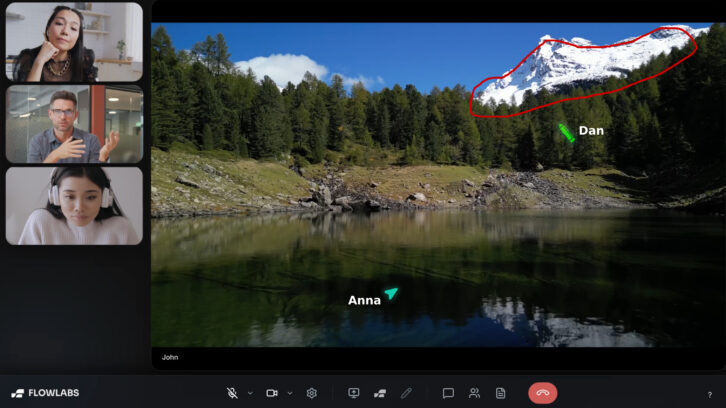
Flow is a fast, high-quality way for creatives to work remotely with clients and teams in real time. It is a remote review tool for post-production work. It lets creatives such as colourists, editors and mixers stream straight out of their NLE (Resolve, Premiere, Pro Tools and so on) to their clients’ web browsers anywhere. It works in near real-time and at an exceptionally high quality. Because we don’t transcode, the viewer sees the live signal straight off the artist’s monitor as it happens. Everyone joins on webcam and audio, and they can chat, leave typed notes and draw straight onto the frame.
Which areas of the workflow is it particularly aimed at?
Colour grading is the headline, because it demands image fidelity and client confidence, and streaming an accurate picture without unnecessary recompression or delay getting in the way is what we’re good at. Editing is a very similar story – cutting on a call and getting notes live. Sound sits right alongside them, with clean audio and delay offset controls that help accommodate different monitoring setups.
How can it help content creatives?
The main thing it gives back is time and momentum. Normally you would have to export an offline, upload it, send a link, and wait for the client to watch and write notes. That can take hours (often longer), and even then you’re still trying to interpret what those notes actually mean. With Flow, the client is in the session as you work. Having everyone on a call and seeing things at the same time makes it feel like they’re in the room – they can talk, type notes, and draw straight onto the frame to point at exactly what they mean. Because the picture is near real time and without server-side transcoding, they’re reacting to the real image, not an overly compressed copy. We wanted it to feel like the client is looking over your shoulder. For a freelancer that leads to fewer rounds and faster sign-offs. It also shapes how we’ve priced it – we offer a prepaid pay-as-you-go option, so if you only need Flow now and then, you’re not locked into a monthly fee.
How does it work?
Flow takes the video signal straight from your workstation, the output of your NLE or grading system, and streams it live to whoever you’ve invited. Your guests watch in a normal web browser without having to install an app. Under the hood it’s built on WebRTC, using WHIP to get the stream from your machine into our system cleanly. The signal is encoded once at the source and sent as-is, so there’s no transcoding and no proxy render, which keeps the image clean even at lower bitrates. Around the picture sits the collaboration layer. Guests can join with their webcam and audio, and use live chat, typed notes, pen tools to draw on the frame, cursor-follow so you can point at things, and session notes. The host can sign in with their email or Google account and be streaming within a couple of minutes. Guests just need a link and to be let into the room, so there’s no account to create and the host stays in control of who’s in the session.
How does it differ from other review platforms?
Remote review usually happens in one of two ways. Either it’s asynchronous, where you export an offline, upload it and wait for notes, or it’s live. The problem with the async route is everything we described earlier; the time it eats into, and the guesswork of interpreting notes after the fact. The problem with most live tools is that they either transcode the image costing quality, or they carry too much latency for anyone to react naturally. Flow is built specifically to avoid both. There’s no file and no upload, so the client sees the work straight off your timeline. Because we don’t transcode, what they’re looking at stays close to the real image, and because it’s near real time, the conversation actually flows.
How does the utilisation of WebRTC and WHIP ensure high-quality, low-latency streaming without compromising the image?
WebRTC was designed for real-time interactive video with sub-second latency, and that is exactly what you need when someone’s reacting to a grade or edit live. It runs over UDP and adapts to the connection in real time, allowing it to stay responsive instead of buffering. WHIP is the piece that standardises getting our stream into that pipeline, so the connection sets up reliably and fast. We encode once at a high quality and pass it through untouched. There’s no second compression pass degrading the picture which is where a lot of quality normally gets lost. This means we can hold a strong image even at lower bitrates. It’s not the same as sitting in front of a reference monitor, but for remote review it’s a strong balance of speed, fidelity and accessibility.
How does using advanced web protocols compare to established industry protocols like Secure Reliable Transport (SRT) and Real-Time Messaging Protocol (RTMP)?
RTMP is the old workhorse. It’s reliable enough for one-way streaming to a platform, but it runs over TCP. The latency is usually a few seconds and it’s tied to older codecs. That delay makes it the wrong choice for interactive review. SRT is a step up as it’s secure, low-latency and much better at dealing with packet loss. This makes it excellent for broadcast contribution and point-to-point feeds. The trade-off is that, unlike WebRTC, it is not something a client can usually open natively in a standard browser. It generally needs an SRT-compatible player, decoder, app, hardware endpoint or gateway at the receiving end. WebRTC’s advantage is that it is browser-native and designed for real-time, two-way interaction, so a client can click a link and join a session in near real time.
How do you avoid transcoding content?
Transcoding is when the video gets decoded and re-encoded somewhere in the chain. Every time that happens you lose a little quality and add delay. The traditional review workflow bakes it in up front; you render an offline, then the platform often re-compresses it again on upload. A lot of live streaming pipelines transcode too, re-encoding the feed server-side to redistribute it, which is common in setups that aren’t built on WebRTC. We avoid both. The stream is encoded once at the source at the quality the creative wants, and then passed through to the viewer without a server-side re-encode. Because WHIP lets us ingest the WebRTC stream directly, there’s no conversion step in the middle. It’s still a real-time codec in a browser, but what the client sees is as close to the source as we can get it.
Other than the areas where it’s currently being used, do you see Flow being used in areas such as live production?
It’s a natural direction. The same qualities that make Flow good for review map neatly onto live monitoring. We’ve had interest from productions wanting to let a director, client or remote crew see a feed from set as it happens. For now we’re keeping our focus on post because that’s where we know the workflow deeply and where we can be most useful, but the underlying technology isn’t limited. Live is somewhere we can see Flow going once the core review experience is exactly where we want it.
What is the next significant technological advancement FlowLabs is tracking, and how might it be integrated into the platform?
There are two main areas we’re currently looking at for Flow. The first is a dedicated app that streams a full 10-bit 4:2:2 reference feed rather than relying on the browser, connecting to hardware like Blackmagic devices. The idea is that a colourist could push a stream into another grade room and view it on a calibrated reference display, which is great for colour-critical work. The second is HDR, and Dolby Vision specifically. High-end grading is increasingly happening in HDR, and streaming that accurately is the obvious next step for a tool like ours. Alongside these we are also watching newer codecs like AV1 mature in the browser for even better quality at lower bandwidth.
What is the long-term vision for FlowLabs over the next three to five years, and how do you intend to continue to maintain the platform’s competitive edge?
Over the next three to five years we want Flow to be the default way post work gets reviewed remotely. Practically that means broadening what we handle; HDR, deeper hardware and reference-feed support, and more of the workflows people run day to day across picture and sound. Our edge is less about out-spending anyone and more about being close to the work. We’re creatives building for creatives, and we’re small enough to respond to real feedback fast. As long as we keep solving the specific problems this industry has, rather than chasing features for their own sake, we have an edge.
What else can you tell us about the platform that we haven’t asked?
The thing we’d most want to add is why Flow exists at all. A lot of the tools that do proper critical remote review are built for big facilities and priced for them, which often puts them out of reach for the freelancers and small studios who need them just as much. We wanted to bring that same professional-grade capability to independents, without the prohibitive cost. That thinking runs through the whole product; you can sign in with Google, you get a hundred free credits to try it on real work, and you can be streaming from your NLE in a few minutes. It carries into how we price it too, with both subscriptions and a prepaid pay-as-you-go option, so you can match the cost to how you actually work rather than paying for time you’re not using. We’re also honest about where Flow shines and where it isn’t the right tool. It’s very good at what it’s built for, and we’re upfront about what we’re still refining. We’d rather people trust us than oversell. And ultimately, we built it because we needed it ourselves.